Trading
When placing a trade on Hibachi, you are trading a perpetual future contract (perp), meaning you provide collateral in USDT to go long or short on a specific asset. This differs from spot trading, where you buy the actual token itself. To learn more about the differences, please refer to this guide
Hibachi currently supports trading for BTC, ETH, and SOL markets. Additional markets will be added periodically according to market demand.
The maximum leverage a user is able to take is 5x for all main markets. This will change as the exchange matures.
Opening a Position
To place a trade on Hibachi, first go to the top left of the screen and select your market from the dropdown menu.
Once you've chosen your desired market, navigate to the right side of the screen and select your order type. For more information on the various order types we offer, check out Order Types.
Next, decide the size of the position you want to open. You can either manually input the exact amount in the size bar or use the slider to adjust the position size based on a percentage of your max position size.
While selecting the position size, you can toggle between displaying the amount in the native asset or in USDT.
Finally, click "Buy" if you want to long the asset or "Sell" if you want to short it. On the summary page, review your order and click "Confirm" to open your position.
Closing a Position
Below the orderbook and price chart, you'll find three tabs:
- Positions: Displays all of your current open positions.
- Open Orders: Shows orders that have been placed but are not yet filled.
- Trade History: A record of all the trades you've executed.
To close an open position, you have two options: a market close or a limit order in the opposite direction. A market close will immediately exit your position but may not secure the best price.
Alternatively, placing a limit order in the opposite direction allows you to close your position at your desired price, though it carries the risk of remaining unfilled if the market doesn't move in your favor.
Market Close
To market close an open position, go to the positions tab and locate the position you wish to close. On the right side, click “Market Close,” which will show you a summary of the trade closure. Here, you can choose the percentage of the position you want to close, then click “Confirm” to complete the process.
Limit Close
To limit close your open position, navigate to the limit tab on the right side of the screen where you can place a trade. Similar to opening a trade, select the amount and your desired limit price, then choose "Buy" or "Sell" based on your original position. Opening a trade in the opposite direction will effectively cancel out your initial position. After that, click "Confirm" to create the order. Once your price limit is reached, the order will execute, and your original position will be closed.
Limits
Order & Position Size
- Min Order Size: 1 USDT
- Max Position Size (Notional): Free Margin * Max Leverage
- Max Position Size (Units): Max Position Size (Notional) / Price
Funding Rate
- Funding Rate Limits: -10% to 10%
Transfer
- Min Transfer Limit: Anything greater than 0
- Max Transfer Limit: The free margin in the account you are transferring from
Pricing
Spot Price
The spot price is the price of the underlying contract of a perpetual future contract. To calculate spot price, Hibachi finds the average price from both Pyth and Stork.
Last Price
The last price is the price of the most recent perpetual future contract traded on Hibachi. It remains very close to the Spot Price thanks to the funding mechanism.
Mark Price
The mark price is a price derived from a combination of spot prices from Pyth and Stork, the last trade price, and funding rates. Its purpose is to provide a robust and fair price for margining, P&L computation and funding rates.
MarkPrice = Median(Price1, Price2, LastTradedPrice)
Price1 = IndexPrice * (1 + LastFundingRate * TimeUntilFunding/8)
Price2 = IndexPrice + MovingAverage(5min)
MovingAverage(5min) = MovingAverage((Bid1 + Ask1)/2 - IndexPrice)
Moving Average is computed every second over a 5 min interval
Fees
Hibachi will launch with the following flat tier rates:
| Maker | Takes |
|---|---|
| 0.015% | 0.045% |
Volume-based fee tiers may be introduced down the line.
Order Types
Market Order
A market order is an order to buy or sell an asset immediately at the best available price in the market.
Limit Order
A limit order is an order to buy or sell an asset at a specified price or better. If the orderbook price is better than the limit price, it'll be filled up until the limit price. If the orderbook price doesn't reach the limit price when the order is placed, it remains open until it can be filled or is canceled. If the order is partially filled due to insufficient market liquidity at that price, the unfilled portion stays active until it is either completed or canceled.
Stop-Market
A stop-market order is a market order triggered when a specific price is hit. Hibachi currently uses the mark price as the trigger price.
Stop-Limit
A stop-limit order is a limit order triggered when a specified price is reached, placing a limit order at the limit price.
TWAP
A TWAP order is a large order divided into smaller suborders, executed in 30 second intervals. Enabling the "randomize" option varies the size and timing of these suborders for added execution discretion, and each child order must meet the minimum order size criteria.
Margining
Portfolio Margin
All accounts will utilize portfolio margin, which results in lower margin requirements and allows users to access more leverage.
Portfolio margin calculates margin requirements by evaluating the risk of the entire portfolio, rather than assessing each position individually.
Calculating Portfolio Margin
Portfolio margin is calculated by determining if the portfolio risk exceeds the available collateral, expressed as:
sum of position risks > account collateral + sum of unrealized position funding + sum of position unrealized PnL
If this holds true, it indicates that the portfolio risk surpasses the portfolio collateral leading to order cancellation or position liquidation.
Risk Panel
The Hibachi UI offers a comprehensive panel for traders to manage risk. This includes:
Equity
- Net Equity is your total account value. It is computed as your USDT balance plus your unrealized trading PnL plus your unrealized funding balance.
Margin
- Free Margin is the portion of your net equity that is not currently used to support positions or orders.
- Used Margin is the portion of your net equity that is currently used to support positions or orders.
Leverage
- Total leverage is the sum of your position leverage and order leverage.
- Position Leverage is the ratio of the value of your positions divided by your net equity.
- Order Leverage is the ratio of the value of your order divided by your net equity.
If your total leverage becomes too high due to pending orders, the system will first cancel these orders to reduce your order leverage. If your position leverage remains too high after canceling orders, existing positions will be liquidated to bring leverage back within acceptable limits.
Risk Score
- Your risk score is the ratio of your total leverage to the maximum leverage you can take. The closer it gets to 100, the higher your likelihood of getting liquidated.
These metrics provide a clear understanding of the risk you are taking, allowing you to make informed decisions and manage your exposure effectively.
Liquidations
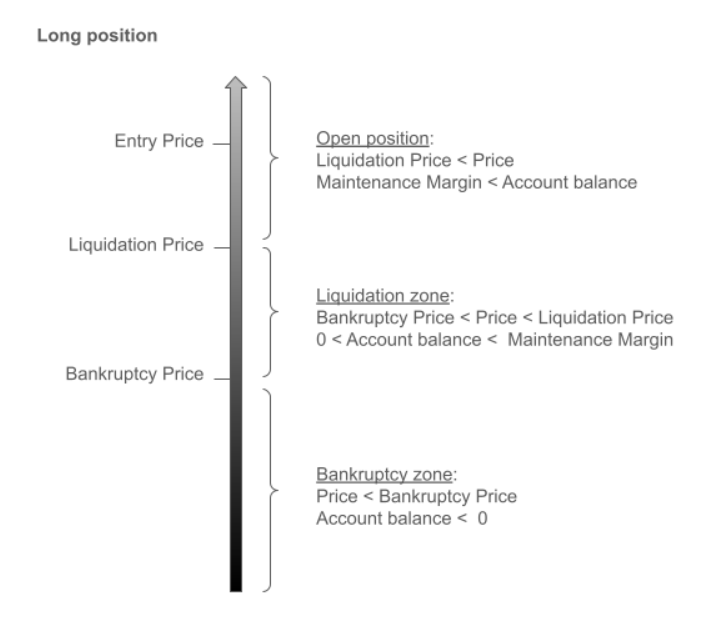
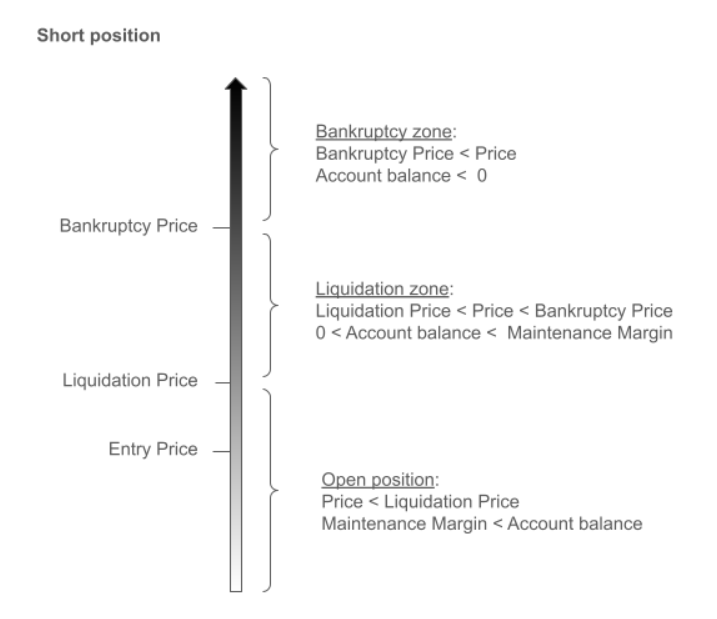
A liquidation event happens when a trader's positions move against them, causing their account balance to fall below the required maintenance margin.
When the account balance dips below the maintenance margin, the system places market orders to partially close the position and bring the balance back above the maintenance margin. Any remaining collateral is returned to the trader, and the liquidation price is updated to reflect the change.
However, if the market moves so unfavorably that the account balance turns negative, the position enters bankruptcy zone. The insurance fund steps in to cover the difference once the position is fully closed, ensuring that the trader doesn’t owe more than their balance.
Instead of seizing funds from liquidations, Hibachi only charges a small liquidation fee, aligning the platform with users and inhibiting incentives to have the user liquidated. This fee is solely used to grow the insurance fund and ensure the exchange's solvency.
Subaccounting
Hibachi offers a powerful subaccount tool that enables users to efficiently separate positions within a single address.
Each subaccount’s margin and positions are isolated from one another, allowing users to trade with isolated margin across different subaccounts. This ensures that each subaccount maintains independent positions, balances, and margins, enabling them to operate autonomously. Balances or liquidations in one subaccount will not impact others, and each subaccount is portfolio-margined for optimized fund management.
To create a sub-account, click on “Main Account” and select “Create Sub Account.” Choose a name for the account, then click the check mark to save it.
To fund the sub-account, click “Transfer” and complete the security verification. Ensure the correct accounts are selected in the "transfer from" and "transfer to" fields, enter the desired amount, and click “Transfer” to finalize.
Funding
Funding rates for crypto perpetual contracts help keep the contract price aligned with the underlying asset. This peer-to-peer fee is paid by one side (long or short) to the other, with no exchange fees collected.
The rate is based on the difference between the contract's price and the spot price. Longs pay shorts when the contract price is higher than the spot price, and shorts pay longs when it's lower.
On Hibachi, funding payments are made every 8 hours—at midnight UTC, 8:00 AM UTC, and 4:00 PM UTC—and directly adjust contract balances. This mechanism helps prevent significant price disparities between the contract and the underlying asset, promoting market alignment.
Calculations
The funding process operates in discrete intervals of 1 second. There are 28,800 seconds in an 8-hour interval.
t represents the current second within the 8-hour interval.
Spot Index Price
Calculated by sampling the spot index price (si) from the oracle every second and compute its moving average from second 0 to t. This moving average si serves as the live spot index for funding estimation. At t = 28,800, it becomes the Final Spot Index Price (fsi).
Perp Index Price
Calculated by sampling the perp orderbook's mid-price every second and compute its moving average from second 0 to t. This moving average serves as the live perp index (pi) for funding estimation. At t = 28,800, it becomes the Final Perp Index Price (fpi).
Funding Calculations
Before the end of the period (t < 28,800), the Predicted Funding Rate is estimated as:
Predicted Funding Rate =
(pi - si)/si
At the end of the period (t = 28,800), the Final Funding Rate is calculated as:
Funding Rate =
(fpi - fsi)/fsi
Insurance Fund
The insurance fund serves as a safety measure to cover negative balances in the event of unexpected platform behavior. Initially funded internally, it will grow over time through the collection of liquidation fees.
Temp Markets
Temp Markets are time-limited derivative contracts that function like perpetuals but with a fixed trading window. Using funding rates to maintain price alignment, these temporary contracts, or temps, enable agile market rotations. By focusing liquidity on the most relevant assets, Temp Markets enhance price efficiency and prevent fragmentation.
Key Concepts
Time-Limited
Temp Markets operate through time-limited contracts, referred to as temps. Temps function similarly to perpetual contracts while they are active—traders can open and close positions, use leverage, and manage risk as they normally would. However, each temp has a predefined expiration time. When the market closes, all open positions are automatically settled at the final mark price.
At expiration, a brief settlement phase occurs before the market is removed, ensuring a smooth transition to new trading opportunities.
Regular Asset Rotation
Temp Markets dynamically introduce and remove assets based on demand. New temps are listed frequently, while older or less popular assets are rotated out, ensuring traders always have access to timely, trending markets. By continuously focusing on in-demand tokens, this approach concentrates liquidity where it matters most, leading to deeper order books and tighter spreads rather than spreading liquidity thinly across inactive markets. This keeps trading fresh and ensures that only the most relevant assets remain available for trading.
Market Relevance
Temp Markets give the community something new to look forward to—whether it’s a highly requested asset or a token gaining momentum in crypto communities. By rotating in fresh tokens, Temp Markets keep the trading environment lively and relevant, encouraging traders to stay engaged and even offer input on which tokens should appear next.